

Open Paralives and press Ctrl+Shift+C or Ctrl+F1 on Windows; on Mac use Command+Fn/Globe+F1. Type HELP, enter a command, and press Enter. Save first because Early Access patches can change syntax or effects.
How to enable cheats in Paralives
Paralives includes a developer-style command console, so you do not need a separate download to use the built-in cheats listed here. Load the household or lot you want to test and create a manual save. On Windows press Ctrl+Shift+C or Ctrl+F1; on Mac use Command+Fn/Globe+F1.
Start with HELP. The console can also suggest commands as you type, which is the safest way to confirm spelling and arguments after a patch. If the shortcut does nothing, close overlays that capture keys, check the keyboard's Fn-lock setting, and retry from live mode.
- Save under a new nameKeep an unchanged save before altering money, relationships, skills or character state.
- Use the console shortcutPress Ctrl+Shift+C or Ctrl+F1 on Windows; use Command+Fn/Globe+F1 on Mac.
- Type HELPReview the command list exposed by the installed game build.
- Enter one commandTest one change at a time so the result is easy to verify or undo.
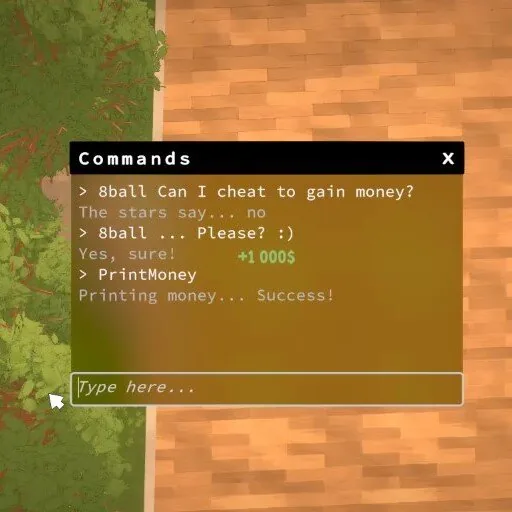
Paralives money cheats
Money commands are the most common reason players open the console. The named commands below add a fixed amount, while SETMONEY replaces the household balance with the amount you provide. Use a modest test value first so you can confirm whether the command adds or replaces funds in your current save.
Command names are not case-sensitive in published references, but writing them in uppercase makes this table easier to compare with console suggestions. Replace bracketed placeholders with a number and do not type the brackets.
- Use
SETMONEY 5000when you want an exact household balance. - Use a named reward such as
PAYDAYwhen you only want to add funds. - Save before testing large values; an exact-balance command can reduce money as well as increase it.
| Command | Effect |
|---|---|
PRINTMONEY [amount] | Adds the specified amount to household funds. |
SETMONEY [amount] | Sets household funds to the exact amount. |
PAYDAY | Adds the selected Para's daily salary. |
PIGGYBANK | Adds 1,000 Paradimes. |
MAKEITRAIN | Adds 10,000 Paradimes. |
JACKPOT | Adds 50,000 Paradimes. |
LOTTERY | Adds a random amount from 1 to 100,000 Paradimes. |
Needs, relationships and character editing
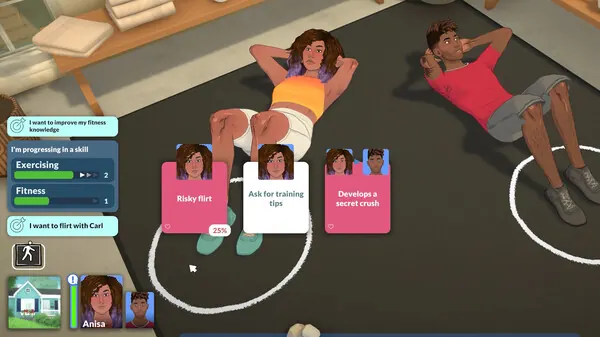
Character cheats can affect more than a visible meter. Select the intended Para before using a targeted command, and check the console suggestion for any required target or value. RELIEFALLNEEDS is useful for a quick test, while SETNEED provides more control when you are reproducing a specific gameplay state.
Use EDITCHARACTER when you need to reopen character editing for the selected Para. Relationship commands are easier to misuse because they may require two characters and a value, so rely on autocomplete and the current in-game HELP entry rather than copying an unexplained argument order from an old post.
| Command | Use |
|---|---|
RELIEFALLNEEDS | Relieves all needs for the selected character. |
SETNEED | Changes a chosen need; use console suggestions for the need name and value. |
SETAGE | Changes the selected character's age stage. |
EDITCHARACTER | Opens character editing for the selected Para. |
MAKEALLFRIENDS | Creates broad friendship changes; use on a disposable test save first. |
BREAKUP | Ends the selected relationship context. |
Skills, jobs and utility commands
For skills and occupations, the console's own argument hints matter more than a copied one-line cheat. Type the command name and use the displayed suggestions to choose a valid skill, occupation or level. This avoids applying a value to the wrong character or using a label removed by a later patch.
Utility commands can solve a stuck test without changing long-term progression. UNSTUCKALL is safer than repeatedly moving or deleting objects around several characters, while SAVE provides a console-triggered save when you are verifying a controlled scenario.
SETSKILLLEVEL: set a selected skill and level using autocomplete.UPGRADEOCCUPATIONS: advance occupation progress for the selected context.UNSTUCKALL: reset stuck characters when normal movement cannot recover them.SAVE: request a save from the console.SHOWUI: restore interface visibility after a screenshot or UI test.BEARandCAT: novelty commands; use HELP to see their current description.
Why a cheat may not work
The usual causes are a closed console, a misspelled command, a missing selected character, an omitted argument or a command that changed during Early Access. Reopen the console with the platform shortcut, run HELP, and type the first few letters to check autocomplete. Test the smallest possible command in a new save before assuming the feature was removed.
Do not install a trainer, Cheat Engine table or unknown executable just because a built-in command failed. Those downloads are separate from Paralives' console, can become incompatible after a patch, and may create account or malware risk. This page covers built-in commands only and does not provide cracked games or third-party cheat tools.
- Confirm the active game window receives the full console shortcut.
- Check spelling and argument order through HELP or autocomplete.
- Select the correct Para before a character-specific command.
- Retry in a copied save without mods if a script mod may intercept input.
- Read current patch notes when a formerly valid command disappears.
Command sources and update status
This guide was checked on August 11, 2026 against the Paralives Wiki cheat reference, the official development page that shows the money command, and current official patch notes. The latest official patch found during this check was 0.1.7, published August 10, 2026.
Because Paralives remains in Early Access, the in-game HELP output is the final authority for the build installed on your computer. The page deliberately groups commands by task instead of claiming that an external list can stay complete forever.

Paralives cheats FAQ
How do I open the cheat console in Paralives?
On Windows press Ctrl+Shift+C or Ctrl+F1. On Mac use Command+Fn/Globe+F1. If a shortcut fails, check Fn-lock and overlays.
What is the Paralives money cheat?
PRINTMONEY plus an amount adds funds, while SETMONEY sets the exact balance. PIGGYBANK adds 1,000, MAKEITRAIN 10,000, JACKPOT 50,000, and LOTTERY gives a random 1-100,000 Paradimes.
How do I see every cheat in my Paralives version?
Open the console with the platform shortcut and enter HELP. Autocomplete is also useful for current command spelling and arguments.
Do I need a mod or trainer for Paralives cheats?
No. The commands in this guide use the built-in console. Third-party trainers and Cheat Engine tables are separate, are not required, and are not covered here.
Can cheats break a Paralives save?
Commands that change money, age, relationships, skills or character state can create unwanted permanent changes. Test on a copied save and keep the original backup.